Free & open source  ·  MIT  ·  development  ·  v1.0.0-dev.0

See how your business
actually runs — in one diagram.

Describe the business once — the CRM, the storefront, the supply chain, payments, the bank, the books — then ask one question. MosoFin-diagram generates a checked, explorable HTML map where every node names the system that owns it, and no number is ever invented. Free, open source, and it runs in whichever coding agent you already use.

Live proof
Generated, checked, interactive Real gallery artifact · 9/9 validation checks
Open artifact
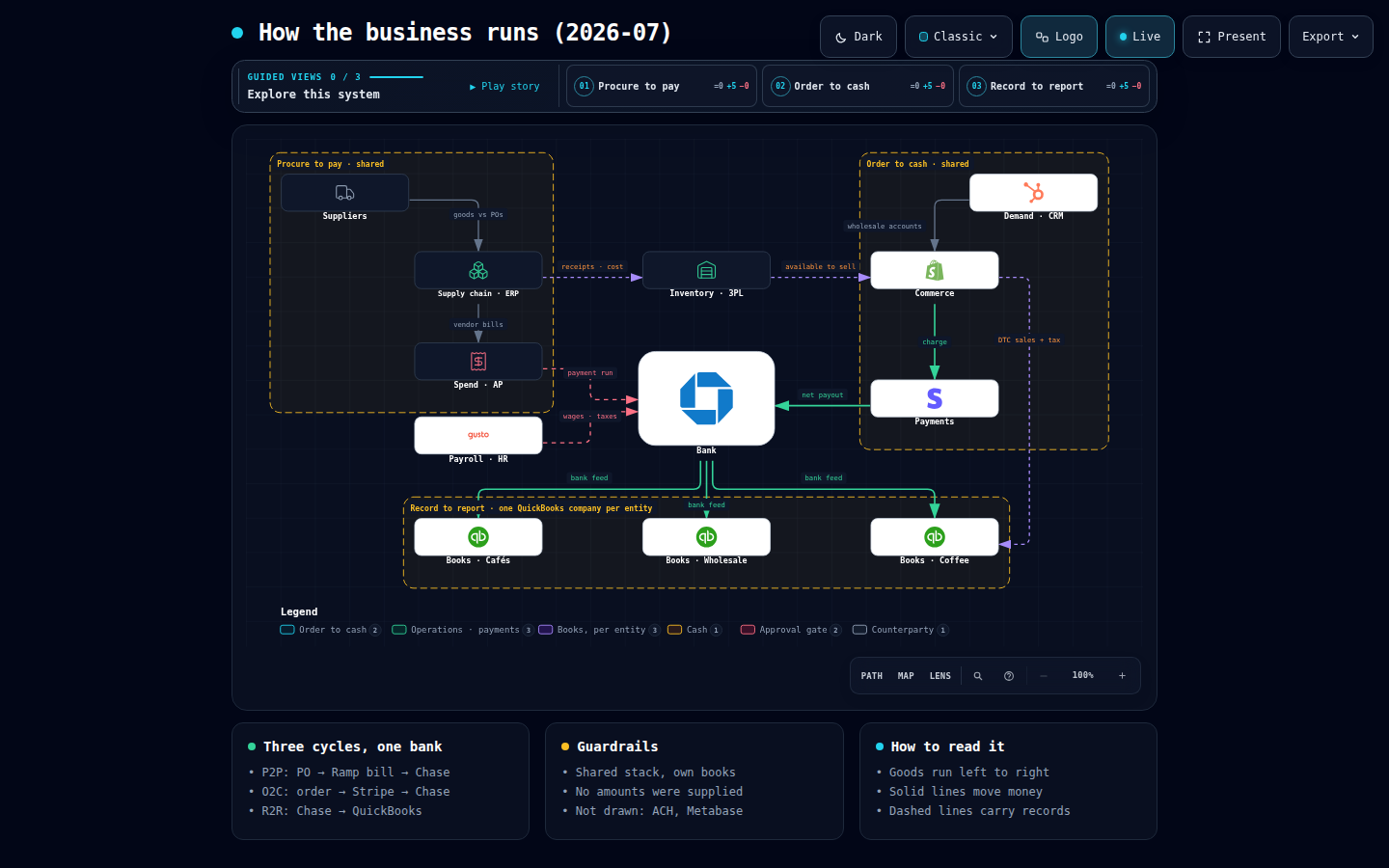
Architecture · Classic · 13 nodes · 14 edges How the business runs — demand to books across three entities
Pin one exact Story Moment, copy its stable link, and let someone else open the same authored node.
Live demos — select to load
05Diagram types
22Scenario recipes
09Verified demos
$0Free, MIT licensed
9/9Checks on every artifact

Five ways to see your business.

The whole operating stack, one process, one order, one reconciliation, or one object's states — describe what you need and Mosofin picks the right visual language. Every image below is a real delivered artifact.

T·01 Business operating map — demand to books across three entities

Architecture

The whole business on one page: CRM, commerce, supply chain, inventory, payments, spend, payroll, bank and books — with the system of record named on every node and boundaries where entities separate.

  • Business operating map
  • Money map · order to cash
  • Who owns which system
  • Shared stack vs per-entity books
T·02 Month-end close runbook

Workflow

Lanes by team or system: a month-end close, a payment run, an approval chain — every handoff named, every gate that can stop the work, and an exception lane for breaks.

T·03 One DTC order to the books

Sequence

One order, invoice or payout traced in time across every system it touches — the charge, the payout, the bank feed, and the three facts the books match.

T·04 July revenue walk

Data Flow

Revenue walks, payout reconciliations and cash runway: gross to net, contra and pass-through items, timing differences, and the residual that must be zero.

T·05 Refund and chargeback lifecycle

Lifecycle

Refunds, disputes, invoices and subscriptions as states — what is in flight, what is awaiting the bank, what is booked, and what is a break.

Index
Browse all nine verified demos
Live artifacts · every type · JSON source beside each

A diagram a controller
can sign off on.

One system of record per fact

Orders, cash and books each have exactly one owner in the map. Two systems claiming the same number is a brief failure, not a diagram — Mosofin stops and asks you to pick.

SOURCE OF TRUTH

No invented numbers

If you did not supply an amount, a volume or a headcount, it does not appear. The renderer never calls QuickBooks, Stripe, Shopify, an ERP or a bank, and never marks a reconciliation green without a zero difference.

AUTHORED · NEVER PULLED

Nine checks before delivery

Every artifact passes schema, geometry, label clearance, crossing and containment checks. A showcase pass means zero errors and zero warnings, with a SHA-256 receipt.

VALIDATED · RECEIPTED

Brand marks for your stack

QuickBooks, Stripe, Shopify, HubSpot, Chase, Gusto and 100+ more, plated in one neutral badge so vendor colour never competes with meaning. Unknown brands stay bare rather than guessed.

111 MARKS

Self-contained HTML

One file. Zero dependencies, no server, no runtime. Open it in any browser, forward it to the board, attach it to the close — it works everywhere and stays private.

ZERO DEPS

Iterate by chat

"Add the wholesale invoice path", "show Chase 1002 as the cash boundary", "highlight the refund route" — refine in plain language. No diagram editor to learn.

CONVERSATIONAL

Inspect and play real routes

Route Journey keeps the complete authored path visible while you inspect any stop or play one finite, reader-controlled pass over each exact incoming relationship.

INSPECT · PLAY · PAUSE

Guided story, dark and light

Each artifact carries up to five chapters that walk a reader hop by hop and name the source of truth at every stop. Both themes ship in the same file; press T to flip.

PLAY · PRESENT · SHARE

Export formats

PNG
Transparent · 4× native
JPEG
Theme bg · 4× native
WEBP
Small · 4× native
SVG
Vector · dual-theme
WEBM
Motion · browser-native
Share Card
1200×630 · for decks and chat

A colour for every business role.

Seven roles, each with coordinated light and dark variants that switch together. The colour is the vocabulary: a reader learns it once and reads every Mosofin map the same way.

Shopifyorders · tax
Shopifyorders · tax
Commerce
Storefront, POS, quotes, CRM
Stripecharges · payouts
Payments
Processor, ERP, fulfilment
QuickBooksP&L · A/R
QuickBooksP&L · A/R
Ledger
Books, sub-ledgers, accounts
Chase 1002operating account
Bank
Settled cash, treasury
Rampbills · approvals
Control
Approval gates, payroll, tie-outs
Bank feeddaily sync
Bank feeddaily sync
Sync
Feeds, integrations, exports
Wholesale accountnet-30
Counterparty
Customers, vendors, the controller

Up and running
in three steps.

One checked Skill for Cursor, Claude Code, Codex, and OpenCode. Their switcher generates exact commands; for Raven, extract mosofin.zip into ~/.raven/workspace/skills, which yields ~/.raven/workspace/skills/mosofin.

1

Install in one command

Run npx skills add MosoFin/mosofin-diagram -g, or open the agent-aware quick start for an exact Cursor, Codex, Claude Code, or OpenCode command. Raven is not a switcher target; for a manual ZIP install, extract mosofin.zip into ~/.raven/workspace/skills, which yields ~/.raven/workspace/skills/mosofin.

2

Describe your business

A short interview: what the business does, which entities are in scope, and which system owns each domain — CRM, commerce, supply chain, payments, bank, books. It is saved as a brief so you only answer once.

3

Ask one question

"Map how our business runs." "Why doesn't Shopify match QuickBooks?" "Can we make payroll on the 15th?" Mosofin picks the diagram type, validates it, and hands back one HTML file you can refine in chat.

Keyboard shortcuts

Diagram guide?
Toggle themeT
Find node / route endpoint/
Trace, inspect, and play a routeR
Semantic radarM
Compare semantic kindsL
Presentation stageF
Open export menuE
Focus nodeEnter
Guided views[ ]
Play storyP
Reading depth / reset+ − 0
Navigate menu↑ ↓
Close menuEsc

# Install globally for Claude Code

npx -y skills add MosoFin/mosofin-diagram --skill mosofin --agent claude-code --global --copy --yes

# Install globally for Cursor

npx -y skills add MosoFin/mosofin-diagram --skill mosofin --agent cursor --global --copy --yes

Free · MIT licensed

Free to use.
Yours to keep.

MosoFin-diagram is an open-source skill under the MIT licence — no account, no sign-up, no subscription, no telemetry. It runs entirely on your machine, and the diagrams it makes are plain HTML files you own outright.

MIT licence · no account · no network calls · your data never leaves your machine

Built by the team behind MosoFin. The skill is free forever and works on its own — if you also want Claude reading your live QuickBooks figures, that is a separate product.

Describe it once.
See the whole business.

One command installs MosoFin-diagram — free and MIT-licensed — for Cursor, Claude Code, Codex, or OpenCode — and the map of how your business runs is one question away.

$ npx skills add MosoFin/mosofin-diagram -g